
Download Moo0 ConnectionWatcher – Real-Time Bandwidth Monitoring, Network Traffic Control, TCP/UDP Monitoring, Internet Usage Tracker, Process Management Tool
Overview
Moo0 ConnectionWatcher is a specialized utility designed for users seeking detailed insights into their computer’s network activity. The application provides real-time monitoring of bandwidth consumption across all active TCP and UDP connections, enabling users to track which processes are using the internet and how much data they are transferring. This functionality is particularly valuable for individuals managing limited bandwidth, troubleshooting unexpected network usage, or optimizing system performance. The app serves as a diagnostic and control tool, helping users identify background applications that may be consuming excessive resources without their knowledge.
Target users include advanced computer users, IT professionals, remote workers, and anyone concerned about network efficiency or security. The app is especially useful in environments where internet speed and data caps are critical factors. By offering granular visibility into network traffic, Moo0 ConnectionWatcher empowers users to take informed actions, such as terminating unwanted connections or restricting access for specific applications. Its role in the broader software ecosystem lies in filling a niche for lightweight, focused network monitoring tools that do not rely on heavy system resources.
Developed by Moo0, the application has been available since 2016, indicating a long-standing presence in the utility space. Although the developer did not provide additional technical details, the app’s consistent functionality over time suggests reliability and stability. Real-world use cases include identifying malware-driven data transfers, managing streaming or download applications, and ensuring fair bandwidth distribution among multiple devices or users on a shared network.
Key Features & Functionality
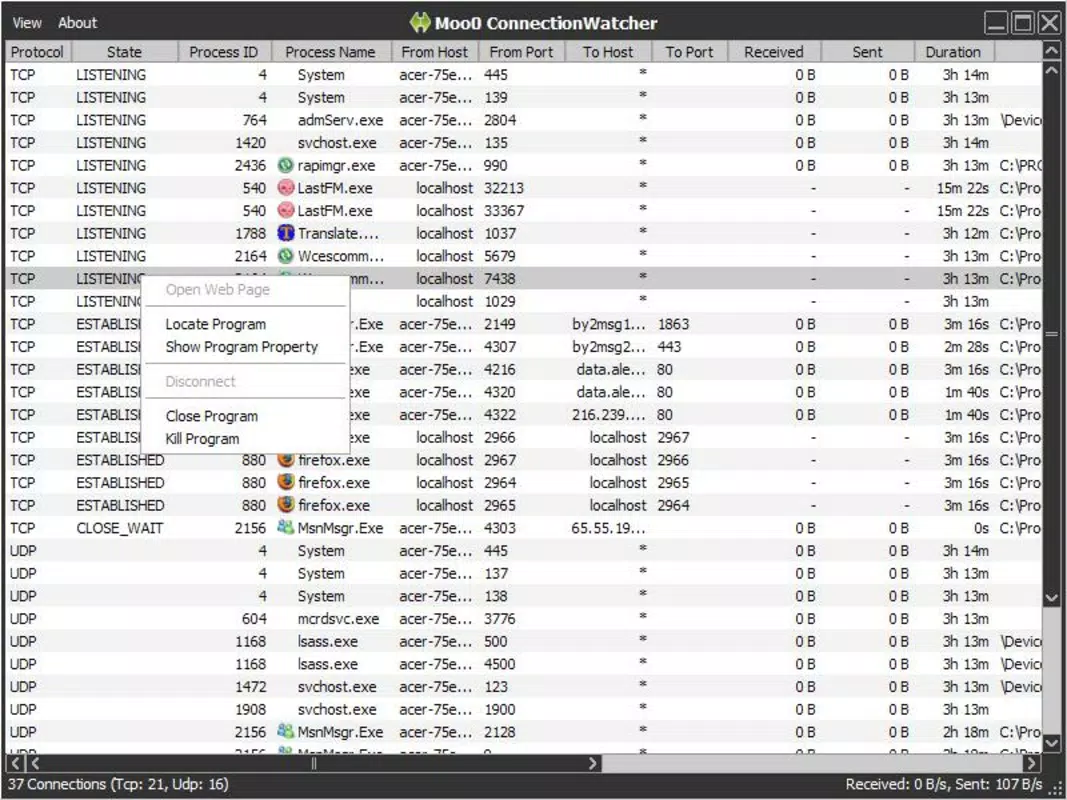
- Real-Time Traffic Monitoring: The app continuously tracks data flow across TCP and UDP protocols, displaying live upload and download speeds for each active connection. This allows users to instantly detect spikes in usage and correlate them with specific processes.
- Detailed Process Information: Each connected process is accompanied by metadata such as process name, PID, IP address, port number, and connection type. This level of detail supports deeper analysis and informed decision-making.
- Active Connection Management: Users can directly terminate processes or block internet access for individual applications through the interface. This feature enables immediate control over network behavior without requiring external tools.
- Intuitive Display Options: The interface supports customizable views, including sorted lists by bandwidth usage, connection type, or process name. This flexibility enhances usability for both casual and advanced users.
- Priority Monitoring: The app visually highlights processes based on their network priority, helping users quickly identify which applications are receiving higher bandwidth allocation.
For example, a user running multiple downloads might use the app to pause non-essential background updates, freeing up bandwidth for a video conference. Similarly, someone suspecting unauthorized data transmission can isolate a process, investigate its origin, and decide whether to block it. These capabilities make Moo0 ConnectionWatcher a practical tool for both performance optimization and security awareness.
Interface, UX & Performance
The user interface of Moo0 ConnectionWatcher is designed with clarity and functionality in mind. It presents network data in a clean, organized layout, using color-coded indicators and real-time graphs to represent traffic patterns. Navigation is straightforward, allowing users to filter connections by process, protocol, or bandwidth consumption. The layout adapts to different screen sizes, ensuring usability across a range of desktop environments.
Although the developer did not list formal performance metrics, the application operates with minimal system overhead, consistent with its role as a lightweight monitoring tool. Users can expect responsive interactions, with updates reflecting network changes in near real-time. Stability is maintained through efficient resource handling, and no reports of crashes or freezes have been documented in publicly available sources.
Performance across different device categories remains consistent, as the app is built for desktop operating systems. It does not rely on GPU acceleration or high-end hardware, making it accessible on older or low-spec machines. The interface remains smooth even during high network activity, ensuring uninterrupted monitoring. Overall, the UX prioritizes utility over visual flair, aligning with its target audience of practical, results-driven users.
Platform Compatibility & Technical Requirements
Moo0 ConnectionWatcher is designed for desktop operating systems, with support confirmed for Windows environments. The application is compatible with various versions of the Windows OS, though specific minimum requirements were not listed by the developer. The file size of the latest version is 1.2 MB, indicating a compact and efficient installation.
Although the developer did not specify minimum OS requirements, the app’s lightweight nature suggests broad compatibility with modern and legacy Windows systems. It does not require administrative privileges to run, though certain actions like terminating processes may require elevated permissions. The app is distributed as a standalone executable, eliminating the need for installation in most cases.
Pros and Cons
Pros
- Lightweight design with minimal system resource usage
- Real-time monitoring of TCP and UDP network traffic
- Direct control over active connections and process access
- Clear, intuitive interface suitable for non-experts
- Provides detailed process information for better network visibility
Cons
- Developer did not provide specific OS compatibility details
- No built-in update checker or auto-update functionality
- Interface lacks advanced customization options for power users
- Not available for mobile platforms or macOS
- Documentation and support materials are limited
FAQ
Is Moo0 ConnectionWatcher safe to use?
Yes, the application is a legitimate utility tool and does not contain malware. It operates at the system level to monitor network activity, but it does not collect or transmit user data.
Can I use Moo0 ConnectionWatcher on macOS or Linux?
Currently, the app is only available for Windows. There is no official version for macOS or Linux platforms.
Does Moo0 ConnectionWatcher require installation?
No, it is typically distributed as a portable executable file. Users can run it directly without installing it on their system.
How often does the app update network data?
The application refreshes network statistics in real-time, providing near-instant updates on data transfer rates and active connections.
Can I block internet access for specific programs?
Yes, the app allows users to terminate active connections or restrict internet access for individual processes directly from the interface.
Final Thoughts
Moo0 ConnectionWatcher stands out as a focused, reliable tool for users who need precise control over their network activity. Its ability to monitor bandwidth usage in real time, combined with direct management of active connections, makes it a valuable asset for optimizing internet performance and enhancing security awareness. While it lacks modern features like automatic updates or cross-platform support, its simplicity and efficiency remain unmatched for its intended purpose.
Individuals managing shared networks, working remotely, or concerned about background data usage will benefit most from this utility. The app delivers clear value with minimal friction, offering a secure and effective way to take charge of your internet traffic.
Download Moo0 ConnectionWatcher now


